How to Create a Clinical Note: Step-by-Step Guide
Write structured therapy notes in under 90 seconds. Choose from SOAP, DAP, BIRP, and 10+ clinical note formats. Step-by-step guide for therapists and clinicians.
Last updated: March 2026
Creating a clinical note in WellNotes takes three steps: enter your session observations, choose a note template, and generate. The Note Editor accepts free-form text or voice dictation and produces structured, insurance-ready documentation in formats like SOAP, DAP, BIRP, GIRP, and more. On average, clinicians save 15-20 minutes per note compared to manual documentation.
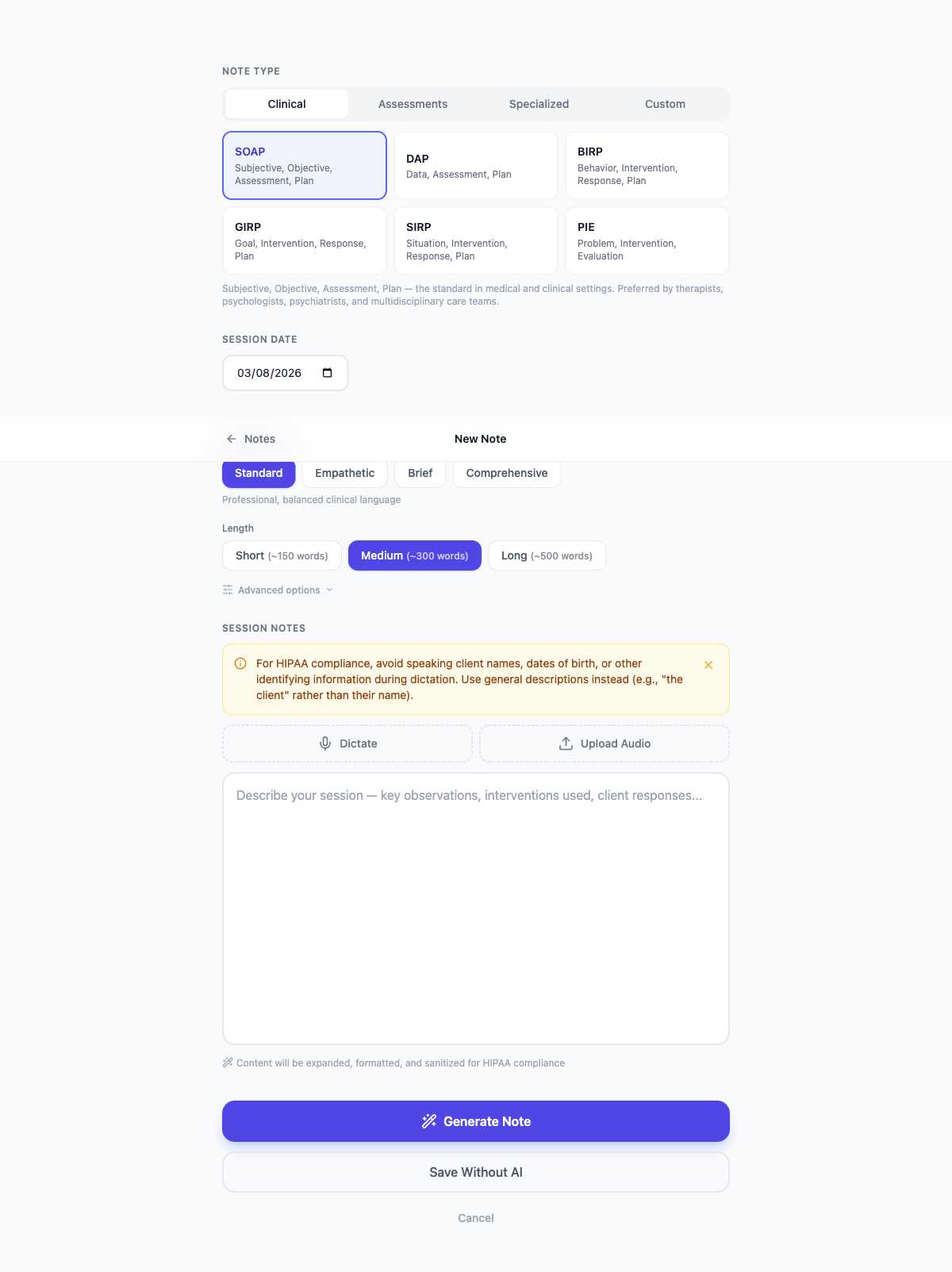
Step-by-step
- 1
Open the Note Editor
From the Notes dashboard, click "New Note" (the + button). The editor opens in a focused, distraction-free view.
- 2
Enter your session observations
In the large text area, type brief notes from your session. Include key topics discussed, interventions used, client responses, mood observations, and any plan items. You don't need to use any specific format — write naturally.
- 3
Choose a note template
Select the format that matches your documentation requirements: SOAP, DAP, BIRP, GIRP, SIRP, PIE, treatment plan, progress note, and more. The template determines the section structure of your output.
- 4
Adjust note style (optional)
Click the style panel to customize tone (clinical, empathetic, concise), note length (brief, standard, detailed), and distribution (balanced or prioritized). These preferences are saved for future notes.
- 5
Generate the note
Click "Generate Note". Within seconds, WellNotes produces a complete, structured clinical note based on your observations and the selected template.
- 6
Review and save
Read through the generated note, make any manual edits directly in the output, then click "Save Note". The note is stored securely on your dashboard.
Tips
- More detail in your observations = a higher-quality output note. Aim for 3–6 sentences minimum.
- Mention specific interventions by name (e.g., "used CBT thought challenging", "practiced DBT distress tolerance") for clinically precise notes.
- You can edit any part of the generated note before saving.
Frequently asked questions
Can I edit a note after saving it?
Yes. From the dashboard, click the Edit icon on any note to reopen it in the editor. You can revise the text and save again.
How many notes can I create?
Every plan starts with a 3-day free trial. Starter plan users can create up to 50 notes per month, and Professional plan users have unlimited note creation. See the Pricing page for details.
Are my session observations stored?
No. Your raw observations (the input text) are only used to generate the note and are not persisted. Only the final formatted note is saved.
How long does it take to write a therapy progress note?
With WellNotes, most therapists complete a full progress note in under 90 seconds. Traditional manual documentation typically takes 10-20 minutes per note. Voice dictation can make it even faster — just speak your observations and generate.
Can I use WellNotes for different clients with different note formats?
Yes. You choose the template each time you create a note, so you can use SOAP for one client and DAP for another. Your style preferences (tone, length) are saved globally but can be adjusted per note.
Related articles
Still have questions? Email our support team — we typically respond within one business day.