Custom Clinical Note Templates for Your Practice
Build your own note templates with custom sections for ABA therapy, trauma-focused CBT, group sessions, or any clinical specialty. Professional plan feature.
Last updated: March 2026
Custom templates let you define your own note structure beyond the built-in formats. If your practice uses specialized documentation — like ABA session notes with Antecedent/Behavior/Consequence sections, or trauma-focused CBT notes with specific safety assessment fields — you can create a template that matches your workflow exactly. Custom templates support up to 10 sections and are saved to your account for reuse across all future notes.
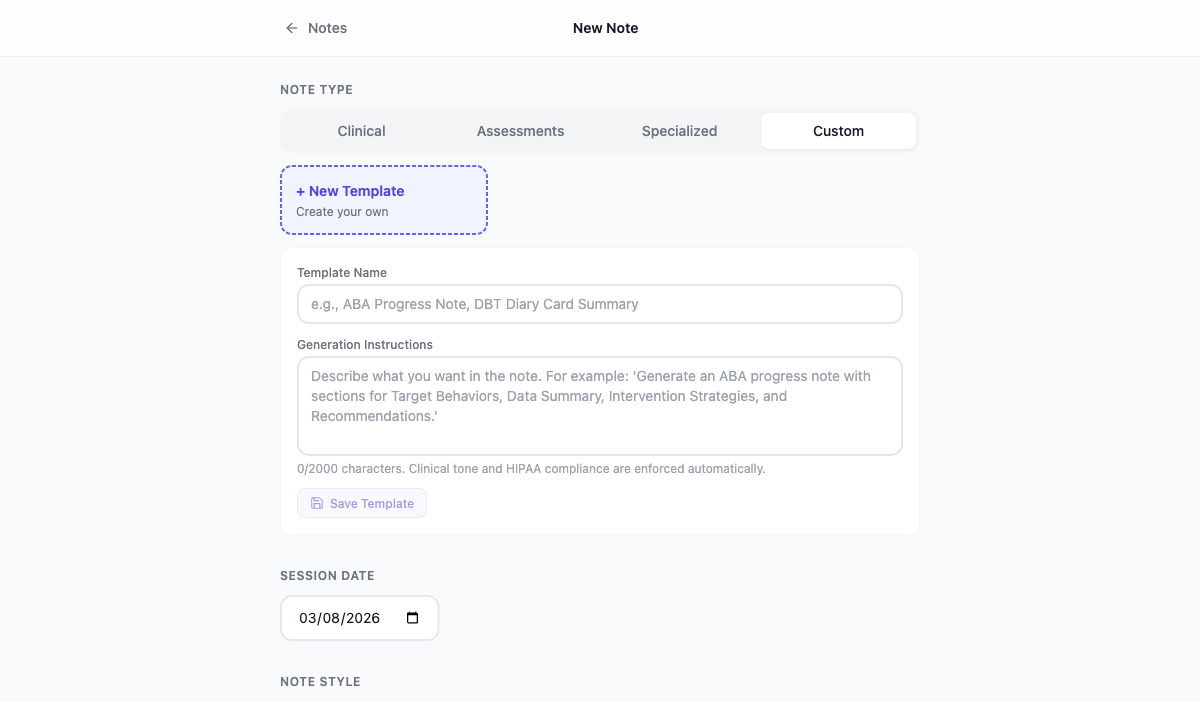
Step-by-step
- 1
Open the Note Editor
Click "New Note" from the dashboard to open the Note Editor.
- 2
Click "Custom Template"
In the template selector, scroll to the bottom and click "Custom Template". If you're not on the Professional plan, you'll see an upgrade prompt.
- 3
Name your template
Give your template a descriptive name (e.g., "ABA Session Note", "Trauma-Focused CBT Note").
- 4
Define your sections
Add section names one by one (e.g., "Antecedent", "Behavior", "Consequence"). You can add up to 10 sections.
- 5
Save and use
Click "Save Template". Your custom template is now available in the template selector for all future notes.
Tips
- Custom templates are saved to your account and persist across sessions.
- You can create multiple custom templates for different client populations or session types.
- Custom templates can be edited or deleted from the template selector in the Note Editor.
Frequently asked questions
How many custom templates can I create?
Professional plan users can create unlimited custom templates.
Can I share a custom template with colleagues?
Not yet — templates are currently per-account. Team sharing is on the roadmap.
Related articles
Still have questions? Email our support team — we typically respond within one business day.